How to run a team of AI agents in one chat app with OpenMausBot
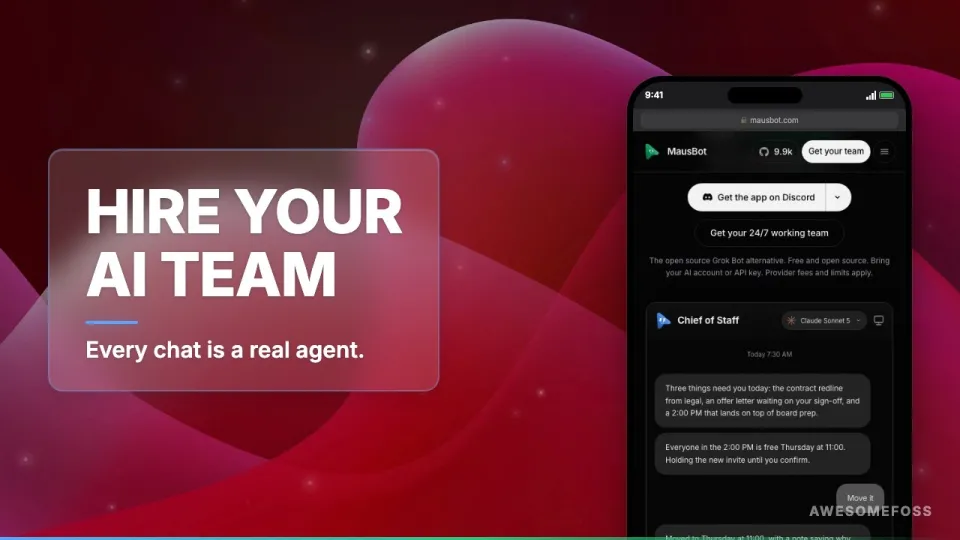
Video: OpenMausBot: Your Team of AI Agents in 1 Chat App — Free
· based on the channel AwesomeFOSS
Key takeaways
- OpenMausBot (also called MausBot, formerly OpenGrokBot) is an Apache 2.0 desktop app for macOS, Windows and Ubuntu where each chat contact is a separate AI agent.
- Agents run locally through the claude, codex or grok CLI on logins you already pay for; transcripts and keys stay in ~/.openmausbot.
- Each bot gets its own model, cloud computer or local VM, voice calls, and 500+ connected apps through Composio, with risky actions shown as approval cards.
- The project reached 9,967 GitHub stars in about 12 weeks and shipped 94 releases.
- An MCP server and a headless CLI make the same agents usable from scripts and CI pipelines.
OpenMausBot is a free, open source desktop chat app in which every contact in the sidebar is a real AI agent instead of a person. You install it on macOS, Windows or Ubuntu, connect the Claude, Codex or Grok CLI you already use, and each bot runs locally on your own machine with its own model, computer and connected apps. The code is Apache 2.0 and lives in the OpenMausBot GitHub repository, so you can read, fork and self-host it without a subscription.
The idea is simple: instead of one chat box that forgets everything, you keep a roster of specialists. A coding bot, a research bot, a bot that watches your inbox — each with a distinct personality and toolset, all in a Telegram-style interface you already know how to use.
What OpenMausBot actually is
OpenMausBot is an open source alternative to hosted agent products such as Grok Bot, Meta Muse, OpenAI dots and Cue by Manus, packaged as a local-first desktop client. The project is also known as MausBot and was formerly called OpenGrokBot; the rename reflects that it is no longer tied to a single model vendor.
The app is written in TypeScript on top of Electron, which is why it ships for the three major desktop platforms rather than as a web service. There is no account to create on the vendor's side and no shared cloud that stores your conversations. Everything the agents do happens through command-line tools you have already authenticated on your own machine.
Key characteristics:
- Chat-shaped UI. The sidebar lists bots like contacts; opening one starts a conversation with that agent.
- Bring your own logins. Agents call the `claude`, `codex` or `grok` CLI, so they use the subscriptions and API keys you already pay for.
- Per-bot configuration. Each agent has its own model, its own computer (a cloud sandbox or a local VM) and its own set of connected apps.
- Approval cards. Any risky action — running a shell command, sending a message, touching a file — is surfaced as a card you approve or reject before it executes.
- Local storage. Transcripts and credentials live in `~/.openmausbot` on your disk.
How to set up your first agent team
The setup follows the same path on every platform: install the app, authenticate the CLIs you want to use, then create bots one by one. You do not need a server, a database or a Docker stack to get started.
- Install the CLIs. Make sure `claude`, `codex` or `grok` is installed and logged in on your machine. OpenMausBot does not ship credentials of its own; it drives whatever you have already set up.
- Install OpenMausBot. Grab a build for macOS, Windows or Ubuntu from the repository releases, or clone the repo and build it with your Node toolchain.
- Create a bot. Give it a name, a personality prompt and a model. This is the step that turns a generic assistant into a specialist.
- Pick a computer. Choose a cloud sandbox or a local VM for the agent to work in, so its file and terminal access is scoped to that environment.
- Connect apps. Add integrations through Composio — the project advertises more than 500 connected apps — so the bot can read mail, post messages or update tickets.
- Test with a low-risk task. Ask the bot to summarize something or draft a message, and watch the approval card flow before you hand it anything destructive.
Once the first bot works, cloning it and changing the prompt and tools is the fastest way to build the rest of the roster.
Agents with hands: computers, voice and connected apps
OpenMausBot agents are not limited to producing text; they can operate a computer, join voice calls and act inside third-party services. The "computer use" layer means an agent can drive a desktop environment inside its assigned VM or cloud sandbox — opening applications, clicking through interfaces and reading what is on screen — which covers tasks that have no API at all.
Voice calls extend the same idea to audio: a bot can be dialed into a call rather than typed at. Combined with the Composio integrations, this makes the difference between an assistant that suggests actions and one that performs them.
The safety model is the approval card. Every action classified as risky pauses and waits for a human decision, which is the practical answer to the usual objection about giving a language model a terminal. You keep the veto; the agent keeps the speed.
Local-first storage, MCP server and headless CLI
OpenMausBot keeps your data on your own disk: transcripts, settings and keys are stored under `~/.openmausbot`. Nothing about the architecture requires the vendor's servers to be running, which matters for anyone handling client work, internal documents or regulated data.
Two interfaces make the same agents usable outside the chat window. An MCP server exposes the bots to any MCP-compatible client, so an editor or another agent framework can call them as tools. A headless CLI lets you trigger agents from shell scripts and CI pipelines — for example, running a review bot on every pull request without a human opening the app.
Because the code is Apache 2.0, self-hosting is not a loophole but the intended mode: you can audit what leaves the machine, patch the approval logic, and run a modified build internally.
The numbers behind the project
Adoption has been unusually fast for a desktop agent client: the repository passed 9,967 GitHub stars in roughly 12 weeks, according to the project's own tracking, and shipped 94 releases in the same period. That release cadence — well over one per week — is a signal of how actively the approval flow, CLI integrations and UI are being iterated.
The licensing is Apache 2.0, which permits commercial use and modification with patent protection, unlike more restrictive copyleft licenses. The maintainer is Milind Soni, and the project's site is mausbot.com.
A caveat worth stating plainly: fast-moving agent tooling changes behavior between releases, and features described here can move or be renamed. Pin a version you have tested if you depend on it for production work.
One assistant versus a roster of bots
The core design argument is that a single general-purpose chatbot is the wrong shape for real work. One box accumulates context it should not have, mixes a client project with a personal errand, and gives every task the same tools and the same permissions.
A roster fixes that by scoping each agent: a bot with access to your email has no reason to hold your SSH keys, and a coding bot does not need your calendar. Separate personalities also produce more predictable output than one prompt asked to be everything. The trade-off is management overhead — you have to name, configure and maintain each bot, and decide which integrations each one may touch.
If your work is a single recurring task, one well-configured assistant is simpler. If you juggle several unrelated workflows with different risk profiles, the multi-agent shape pays for itself quickly.
Links and resources
- Repository and releases: https://github.com/milind-soni/OpenMausBot
- Official website: https://mausbot.com
The repository is where builds, issues and the license live; the website is the quicker overview if you just want to see the interface before installing anything.
Summary
OpenMausBot turns the chat app metaphor into an agent manager: each contact is a real bot with its own model, computer and integrations, running locally on the CLI logins you already have. It is Apache 2.0, stores data in `~/.openmausbot`, gates risky actions behind approval cards, and exposes the same agents through an MCP server and a headless CLI. With 9,967 stars in about 12 weeks and 94 releases, it is one of the fastest-moving open source alternatives to hosted agent products. The video breakdown above comes from the AwesomeFOSS channel, which covers free and open source software weekly. Start by cloning the OpenMausBot repository and building a first bot around one task you already trust a model to attempt.
Source: OpenMausBot: Your Team of AI Agents in 1 Chat App — Free · Markdown version
Questions & answers
Is OpenMausBot free to use?
Yes. The code is released under Apache 2.0, so you can download, modify and self-host it at no cost. You still pay your model provider, because the agents run through the claude, codex or grok CLI on your own existing logins.
Does OpenMausBot send my data to a server?
Transcripts, settings and keys are stored locally in ~/.openmausbot, and the app is local-first by design. Data still reaches your model provider when an agent makes a request, but there is no separate OpenMausBot cloud account holding your conversations.
Which models can the agents use?
Each bot is configured with its own model and is driven through the Claude, Codex or Grok command-line tools. That means the available models are the ones your installed CLIs and subscriptions support, and you can mix vendors across different bots.
What stops an agent from doing something destructive?
Risky actions are surfaced as approval cards that a human must accept before execution. Agents also work inside an assigned cloud sandbox or local VM, which limits what files and systems they can reach in the first place.